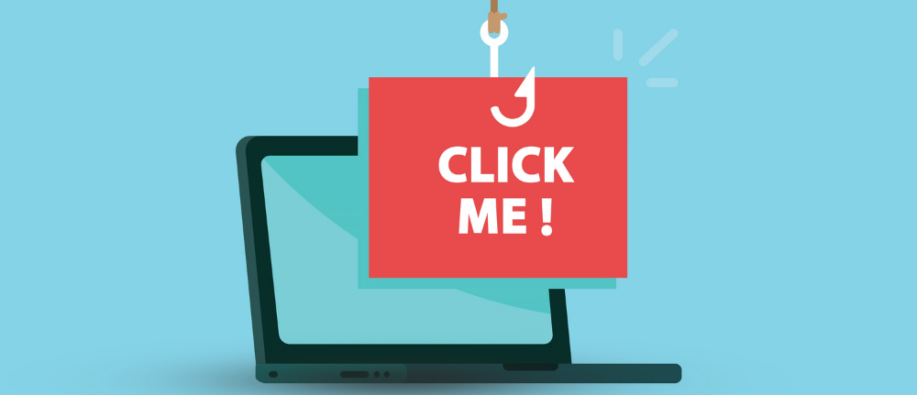
Cyberattacks have become the most dangerous threat in the online world today. Digitalization has brought tremendous technological shifts, but on the other hand, it has given rise to growing threats. Let’s take an example: you open an email, click a random link, and it installs malware on your device!
Well, bad actors trick users through social engineering, leading them to perform actions that pose threats. ClickFix attacks fall under such tricks, where hackers manipulate users into copying and running malicious commands on their devices. According to expert research, businesses see human error and social engineering as their primary vulnerabilities in 2026.
These attacks are dangerous as they bypass a range of traditional security practices and rely completely on human error. You don’t understand what’s happening; as a small pop-up, you click on a website to inject malware into your device. To help you understand better, this blog explains everything about the Click Fix attack.
What is ClickFix Attack?
ClickFix is a social engineering technique that aims to trick users into executing malicious commands on their systems. They mainly benefit from user psychology to solve a technical issue that starts with a pop-up window.
To fix it initially, users need to complete human verification, CAPTCHA checks, or other tasks on the website via email. The technique is called ClickFix because the notifications users receive include a “fix” button prompting them to resolve the issue. It suggests that users click on the fake prompt, then copy, paste, and run the command directly in the Windows terminal, Windows Run dialog box, or PowerShell. When the Enter key is pressed, the command is pasted directly into the system, leading to phishing, malware, drive-by downloads, etc. ESET has also mentioned ClickFix as one of the major techniques, with growth of over 500% compared to 2024.
How Do Attackers Carry Out ClickFix-Based Attacks?
As mentioned earlier, the copy paste malware technique is a form of social engineering attack. It mainly tricks users psychologically by forcing them to click a fake link in an email, click a pop-up notification, and create a sense of urgency, without letting users think. They make users believe that immediate action needs to be performed.
Instructions Hackers Use to Trick the Users
- Click the button to copy the code
- Press the key with combination {Win} + {R}
- Press the key with combination {Ctrl} + {V}
- Press {Enter}
When the user clicks on the fake “fix” button, a hidden script is copied to their clipboard. Alongside, pressing Win + R, open the Run dialog, and Ctrl + V pastes the malicious PowerShell command into it. On hitting Enter, it executes the script with the user's own privileges.
This way, malware is being downloaded and installed, which causes users to infect their own computer by running the script on their own.
Some of the Common ClickFix Attack Techniques
Hackers use the ClickFix attack technique in different ways. Meaning, it can appear in several forms. Following are some of the scenarios you should know to be aware of the unexpected issues.
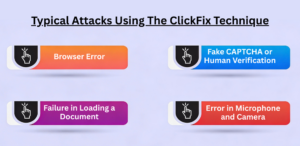
1] Browser Error: One common scenario is, the page requested is not visible to the user, so they are asked to refresh the browser, or update the same to display it.
2] Fake CAPTCHA or Human Verification: This is the most common way to implement the ClickFix attack. Here, when you visit a site, you are asked to perform a verification, whether you’re a robot or a human.
3] Failure in Loading a Document: It might have happened to you that you are trying to access a certain document on a website in PDF or Microsoft Word format. Now, ask to install a separate plugin to view the PDF or Word document.
4] Error in Microphone and Camera: Another form of the ClickFix attack targets the commonly used video conferencing platforms, such as Google Meet or Zoom. Here, users receive the meeting link but cannot join due to issues with the camera and microphone. The user gets a message or a pop-up saying, how to fix it? This is where users are tricked, and the system is compromised.
Where Can You See Copy Paste Malware Attack?
ClickFix attacks commonly appear in the following places:
Website pop-ups: They mainly appear on websites, in pop-ups, ads, or cookie consent prompts on malicious websites.
Links in Email: Certain emails create a sense of urgency and push users to perform a particular action, for example, the link in the email, which will thereafter lead to a ClickFix prompt.
Phony Cloudflare 'I am not a robot' on Scam pages: Certain pages trigger a malicious script to be copied to your device when you check the checkboxes.
Compromised websites displaying Fake CAPTCHA: Hackers inject malicious code into legitimate websites, showing a CAPTCHA that appears to be real. It is designed to go with the ClickFix attack flow.
ClickFix Attack Prevention:
The following are some of the measures you can follow to be safe from the social engineering attack:
- Ignore the Unexpected System Warning: Double-check for the system warnings asking you to act, mainly for copying and pasting the code to your terminal.
- Disable Run Dialog: If possible, organizations can use Group Policy to prevent access to the Win + R key combination for main users.
- Do Not Run Any Code Randomly: Make sure you do not run any code from an untrusted source, as it can lead you to the ClickFix attack. Avoid following prompts you receive via messages or pop-ups.
- Monitoring log activity: Ensure log activity for the Run dialog and clipboard is captured in Windows Event Viewer. Also, add alerts if any suspicious prompts are seen in the command.
Tips to Follow If You Get the Victim
If you unexpectedly become the victim of paste, and click, make sure to follow the tips below:
- Stop the internet connection immediately. This will avoid further mishaps.
- Inform your IT department about the mistake or unexpected paste and attempt your end.
- Be calm, don’t panic, and take the required help from the senior IT team.
Final Words!
The “how to fix” statement can put you at risk! ClickFix attacks are here to stay, so we, as users, must be wise enough to avoid such tricks from hackers. Ignoring the risks associated with them can compromise your system and lead to unexpected loss of sensitive information. Data is never safe in the hands of hackers.
At SecureITWorld, we publish top-class content from the cybersecurity world. Visit us now to stay informed and stay up to date with the latest blog topics.
FAQs
Q1. What are the common signs of a ClickFix attack?
Answer: Some of the common signs of a ClickFix cyber-attack include pop-up warnings, system alerts, and prompts that ask users to fix errors quickly. These messages appear on some websites and use a sense of urgency to create pressure on users to click quickly.
Q2. Does ClickFix attack install viruses?
Answer: Yes, they can download spyware or malware, which can disrupt the system's functioning.
Recommended reading:
Understanding Zero Click Searches – Definition and Their Effects on SEO
WhatsApp 2026 Update Introduces “Strict Account Settings” for One-Click Security