

Keeping your company's software up to date through enterprise patch management is one of the best ways to protect it from hackers. However, you cannot just immediately install every single software update as soon as it drops.
In practice, the security team has to balance multiple priorities. They need to figure out which vulnerabilities pose the highest risk, make sure a fix won't accidentally disrupt other systems, and schedule updates to avoid costly downtime. Finally, they have to double-check their work to make sure the problem is actually solved.
The urgency is clear. Take a look at the latest Verizon 2026 Data Breach Investigations Report (DBIR); it shows exactly how fast unpatched software is becoming a favorite target for hackers. The report shows that attackers are increasingly using software vulnerabilities to break into systems, which now account for 31% of all breaches.
In fact, exploiting these flaws has officially surpassed stolen credentials as the top entry method for hackers.
For security teams, the real challenge is building an effective patching process that bridges the gap between vulnerability intelligence and deployment.
What Is Enterprise Patch Management?
Managing updates on a personal device is simple, but enterprise patch management is much more complex. It helps organizations keep their technology up to date and secure. The process involves identifying software updates, deciding which ones should be applied first, testing them before deployment, and verifying that they work as expected.
The goal is not just to install updates. It is to reduce the risk of known vulnerabilities while maintaining system stability and supporting business operations.
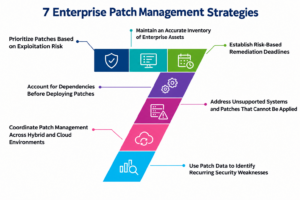
7 Enterprise Patch Management Strategies
1. Prioritize Patches Based on Exploitation Risk
Not every vulnerability needs immediate attention. Treating every vulnerability as an emergency quickly exhausts security teams and delays fixes for the most serious risks.
Instead, prioritize patches based on multiple risk factors:
Known exploitation: Check whether attackers are actively exploiting the vulnerability.
Business exposure: Determine whether the affected asset is internet-facing or accessible through a less-trusted network.
Asset criticality: Consider the system's role and the sensitivity of the data it handles.
Vulnerability severity: Use severity scores as one input rather than the sole decision criterion.
Available mitigations: Identify whether temporary protections are available when immediate patching is impractical.
The CISA Known Exploited Vulnerabilities (KEV) Catalog is an excellent resource for identifying flaws that attackers are already actively using. For instance, an active threat on an internet-facing VPN needs a much faster fix than a severe bug trapped on an isolated test system.
2. Maintain an Accurate Inventory of Enterprise Assets
Security teams cannot reliably patch systems they do not know exist.
To address this, teams need a complete list of all company technology. The inventory must include:
- Physical servers and virtual machines
- Employee devices and cloud systems
- Business apps and network gear
The inventory should also flag assets that standard patching tools often miss. This includes legacy systems, remote devices, and specialized infrastructure.
Whenever possible, link your asset discovery tools with your vulnerability management data. This helps teams determine exactly which systems are affected by a specific vulnerability, so they can avoid running massive, company-wide deployment campaigns.
Regularly double-check your asset inventory against your endpoint management tools, cloud inventories, and vulnerability scans. If you find gaps, investigate them immediately rather than assuming unlisted systems are secure.
3. Establish Risk-Based Remediation Deadlines
A patching policy needs clear deadlines, but applying a single timeframe to every vulnerability ignores real-world risk.
Instead, base remediation schedules on actual threats, internet exposure, system importance, and business impact. Clearly document who owns the task, when the countdown begins, and who can approve an exception.
For instance, an enterprise might set a 24-hour target for certain actively exploited vulnerabilities affecting exposed critical systems. This is an illustrative internal policy target, not a universal requirement.
If you cannot deploy a patch within the required timeframe, a documented exception must be filed. It must document the reason for the delay, current compensating controls, the risk owner, and an expiration date.
This approach prevents temporary exceptions from becoming permanent security gaps.
4. Account for Dependencies Before Deploying Patches
Enterprise systems are deeply interconnected. A single patch to an OS, database, or shared app can easily break dependent workflows, authentication services, and integrations. Before deploying updates, map these critical dependencies to identify high-risk areas.
For instance, updating a database without checking application compatibility can instantly crash a vital service. To prevent these operational failures, coordinate your patching schedule with application owners and follow a strict, approved deployment sequence for tightly coupled systems.
5. Address Unsupported Systems and Patches That Cannot Be Applied
When legacy applications, end-of-life operating systems, or vendor restrictions prevent patching, you must manage them through a documented risk plan. If no patch exists, look for a full upgrade or replacement.
In the meantime, protect the asset by restricting network access, turning off risky features, applying compensating controls, and monitoring for suspicious activity.
For example, you can isolate an unsupported industrial system from the corporate network and limit its traffic while planning its replacement. Always review exceptions regularly because compensating controls reduce exposure but do not remove the underlying vulnerabilities.
6. Coordinate Patch Management Across Hybrid and Cloud Environments
Hybrid environments require tailored patching strategies.
Virtual machines require traditional guest operating system and application updates. Containers work differently. These vulnerabilities usually exist in the container base images or application dependencies. Team should rebuild affected images and redeploy them through your delivery pipeline rather than manually patching running containers.
Cloud providers maintain some infrastructure, but customer responsibilities depend on the service model. Assign clear ownership across all technology teams:
- Cloud virtual machines: Patch guest operating systems and applications.
- Container images: Scan dependencies, rebuild affected images, and redeploy.
- Managed services: Confirm which updates the provider handles and which remain the customer's responsibility.
- Hybrid infrastructure: Use consistent risk classifications and reporting with platform-specific procedures.
7. Use Patch Data to Identify Recurring Security Weaknesses
Patch reports should explain why vulnerabilities remain unresolved, not just count total updates. Focus on recurring failures, missed maintenance windows, unclear ownership, and the specific platforms that repeatedly delay updates.
Combine patch records with your vulnerability findings and asset criticality. This makes it easy to spot overdue critical systems, vendor delays, or updates put on hold because of compatibility bugs or limited team capacity.
Also track whether the same vulnerabilities keep recurring because systems are deployed from outdated images or templates. If a flaw keeps reappearing in new cloud instances, it may signal outdated images. Updating the image and build process prevents the same issue from returning.
Ultimately, fixing the underlying process is far more effective than repeatedly patching individual machines.
Conclusion
Effective enterprise patch management requires risk-based prioritization, accurate asset inventories, clear deadlines, dependency checks, and a plan for systems that cannot be patched normally.
By establishing clear ownership across hybrid environments and tracking recurring failures, security teams can permanently fix persistent weaknesses, minimize overall exposure, and safeguard critical business services.
FAQs
Q1. How can organizations verify that a security patch has worked?
Answer: To confirm a patch worked, check the installed software version or patch status, then run a follow-up vulnerability scan. Don't rely solely on a deployment tool's success message; verify that the vulnerability is no longer detected.
Q2. Should organizations patch third-party software as well as operating systems?
Answer: Yes. Browsers, business applications, plugins, and software libraries can contain vulnerabilities even when the operating system is fully updated. Include supported third-party software in the patching process and prioritize updates according to risk.
Q3. How do you measure the success of enterprise patch management?
Answer: An enterprise can measure success through patch compliance rates, time taken to fix vulnerabilities, failed deployments, and the number of overdue critical patches. These methods show whether the program is reducing risks rather than simply installing updates.
You May Also Like:
Managing the External Digital Estate in an AI-Driven Enterprise