

Cyberthreats are advancing rapidly today, exploiting devices, finding loopholes in systems, and causing financial losses for organizations and businesses alike. From SMBs to Fortune 500 companies are worried about these devastating cyberthreats. With large, interconnected networks, securing endpoint devices such as laptops, desktops, mobile phones, and servers has become critical.
With remote work flexibility and attackers using deceptive practices, you need a solid approach that can protect you in the long run. Fortunately, endpoint hardening is one of the most effective cybersecurity practices that involves a range of proactive measures to minimize the attack surface and keep endpoints secure against cyber threats. The goal is to reduce entry points for attackers and defend against cyber threats. We've curated this blog to help you understand it better, including the techniques, benefits, and more. Let's get started.
What is Endpoint Hardening?
Endpoint hardening is protecting your endpoints like laptops, smartphones, or other devices before the attack takes place. To reduce impact, this security approach turns off unnecessary applications, enforces privilege restrictions, updates software, and adds other preventive measures to keep attackers from targeting or exploiting vulnerabilities. It blocks attacks in the first place, strengthens device security, and reduces system vulnerability.
Endpoint hardening isn't a one-time task; it's an ongoing process. It needs continuous monitoring, regular audits, and implementation of security controls. This practice works closely with patch management, vulnerability management, and incident response.
Why Does Endpoint Hardening Matter for Organizations?
Cyber threats are growing at an unprecedented pace, as attackers use artificial intelligence and exploit device vulnerabilities. That said, endpoints are a primary target for cyberattacks because they sit at the edge of networks and interact directly with users.
Without hardening endpoints, a single vulnerable laptop or desktop can lead to data breaches. Hardening provides a strong foundation for comprehensive protection. Alongside, implementing the right strategy can enhance both business device security and resilience.
According to the CrowdStrike 2026 Global Threat Report, eCrime breakout time dropped to 29 minutes in 2025, down from 48 minutes in 2024 and 98 minutes in 2021. In this scenario, simply implementing best security practices is not enough; attackers have started targeting infrastructure. Endpoint hardening slows down. Thus, effectively implementing this approach can go a long way toward strengthening an organization’s overall device security.
List of Top Endpoint Hardening Techniques to Keep Your Business Devices Secure
1. Inventory and Scope your Endpoints:
Before implementing endpoint hardening, identify all managed endpoints and their operating systems, know the ownership and business role and find the devices that are unmanaged or no longer required.
How to Implement:
- Find unmanaged, unauthorized, or outdated devices.
- Identify all managed endpoints and their operating systems.
- Maintain an inventory of laptops, desktops, and mobile devices which are updated.
Example: A large-scale organization found laptops that are not used connected to its network. The company then enrolls in an unmanaged management system.
Tools: Microsoft Intune, Microsoft Defender for Endpoint.
2. Automatic Updates:
Allow automatic updates for all the applications, operating systems, and firewalls on your device. This helps to close known vulnerabilities.
How to Implement:
- Turn on the automatic updates for the system.
- Focus on critical security patches.
- Verify patch installations across endpoints.
Tools: Heimdal Free and UCheck
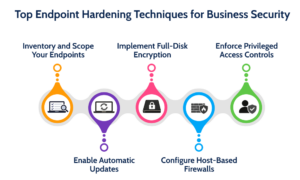
3. Full-Disk Encryption:
It is a security approach that converts the data on storage drive including the applications, operating systems, and others into scrambled code that cannot be understood easily.
How to Implement:
- Securely manage encryption and recover keys.
- Make sure to enable BitLocker on supported Windows devices.
- Implement FileVault on macOS devices.
Example: An organization enables BitLocker on all employee laptops so that data remains protected if a device is lost or stolen.
Tools: Windows uses BitLocker, Linux uses LUKX, and macOS uses FileVault.
4. Host-based firewall
A host-based firewall is a program installed on a computer, laptop, or mobile device. It can monitor and filter incoming and outgoing network traffic for the specific machine.
How to Implement:
- Choose a host-based firewall to secure individual hosts
- Apply when in conjunction with a network firewall for layered security
Example: An IT admin configures Windows Defender Firewall to restrict unnecessary inbound connections on employee laptops.
Tools: Windows Defender Firewall, Linux UFW, and Microsoft Intune
5. Privileged access controls:
Limit administrative access to reduce malware risk—separate user and admin roles to reduce the risk of compromise.
How to Implement:
- Give temporary elevated privileges as needed.
- Regularly review privileged access.
- Use different administrative accounts.
- Limit the local administrator rights that are not necessary
Example: Employees use their standard accounts, and IT administrators use other accounts for system maintenance.
Tools: Microsoft Intune and Microsoft Entra ID
What are the Benefits of Endpoint Hardening?
Below are some of the strategic benefits of endpoint hardening:
- Lower risk of breaches: Helps to reduce vulnerabilities, leaving fewer points for attackers.
- Continuous protection: All the endpoints follow the same security standards across the organization.
- Resilience against threats: Hardened devices can combat malware, phishing, ransomware, and other attacks.
- Regulatory compliance and readiness: Audit-ready endpoints can help organizations meet security standards like HIPAA, ISO 27001, and PCI DSS.
How to Start Endpoint Hardening? A Clear Roadmap
Implementing endpoint hardening involves several steps. Take a look at the step-by-step approach organizations can follow.
Step 1: Define the Scope of Inventory
Make sure to identify every managed laptop, desktop, or server in your environment with the help of Endpoint Management or IT Asset Management tool. Separate group endpoints by operating systems such as Windows, macOS, Linux, and iOS.
Step 2: Establish a Configuration Baseline
No need to build rules from scratch. Take standardized baselines for the Center for Internet Security (CIS) or Defense Information Systems Agency Security Technical Implementation Guide (DISAA STIGs) for your specific OS.
Step 3: Pilot:
In this stage, push your configuration baseline to a small, test group basically pilot before rolling out to the final stage.
Step 4: Roll Out:
Follow a phased approach to system lockouts, configuration errors or business disruptions across the fleet.
Step 5: Monitor for Drift
In this stage, there is continuous tracking and detection of configuration changes, ensuring unauthorized changes or security vulnerabilities are addressed effectively.
How to Track Endpoint Hardening Success?
It is essential to track the endpoint of hardening success. Below are some of the points to consider:
- Baseline Compliance Rate: Estimate the percentage of endpoints meeting the standards such as Center of Internet Security (CIS) or National Institute of Standard Technology (NIST).
- Configuration Drift: Make sure to monitor how hardened settings change without authorization and track the time it takes to automatically revert it back.
- Overdue Exceptions: Monitor and manage unresolved security exceptions that exceed their approved remediation deadlines.
Wrapping It Up!
So, we've come to an end. Endpoint hardening is an effective approach that keeps attackers away from devices in the first place. By implementing the techniques mentioned above, businesses can definitely strengthen their overall endpoint security posture. It can also reduce data breaches and meet compliance needs effectively.
To read more such informative blog posts, head over to our website.
FAQs
1. Is hardening the same as patching?
Answer: No. Patching is used to fix vulnerabilities in software by installing updates. Hardening, on the other hand, changes settings to reduce what can be targeted in the first place.
2. How long does it take to implement endpoint hardening?
Answer: The time required depends on the environment size and complexity. Small organizations with 50-100 endpoints can complete the basic hardening in 2-4 weeks by using automated tools. Whereas large enterprises with thousands of endpoints need 3-6 months for comprehensive hardening.
3. What are some of the common challenges in implementing endpoint hardening?
Answer: Below are some of the common challenges:
- Users resist policy changes in an organization.
- Device and OS security diversity makes it difficult to apply uniform security baselines.
- Identifying and fixing system vulnerabilities.
Recommended Reading:
The Risks of LLM-Generated Passwords You Need to Know
Threat Detection and Response (TDR) in Cybersecurity: Explained
Data Privacy Laws: Key Information You Need to Know About Protection and Compliance