Tax season is stressful enough but imagine fraudsters making it worse by stealing your bank details and Social Security number. Unfortunately, this is no longer hypothetical; it’s happening right now.
Scammers are actively monitoring your financial activities, waiting for the right opportunity to create urgency and execute online tax scams. A study finds that in 2024, the IRS recorded approximately 300,000 identity fraud reports, leading to over $5.5 billion in tax fraud. Google highlights that in 2026, fraud industry professionals observed a 67% increase in fraud attempts. Additionally, Google Search saw a 120% surge in queries for ‘secure tax’ and ‘tax identity shield’ last month.
As Google states, “We’re sharing how we help keep you safe with AI-powered scam detection, text-vetting via Circle to Search, real-time Safe Browsing, Gmail warning banners and transparency tools to help you unmask fake tax services before you click.”
Considering users’ rising concerns, Google has shared five ways to help you avoid online tax scams. Let us understand online tax scams, their common patterns, and the strategies suggested by Google to combat tax fraud.
What are Tax Scams?
Tax scams involve fraudsters impersonating professionals from government tax departments to defraud people, stealing their sensitive information. Scammers often create a sense of fake urgency among people to file taxes or address an error in tax filing. Messages, Calls, and emails are the common ways to execute such scams. Apart from that, phishing, smishing, and vishing are also adopted to carry out tax scams.
In short, tax scams are the threats taxpayers often face, leading to the revelation of their personal and financial information to scammers. Such threats can cause significant financial damage to people. Tax scams usually observe a rise during the tax season, due to which people often fail to identify malicious attempts.
Common Methods to Execute Tax Scams:
- Calls, Texts, and Emails: Scammers commonly use phone calls, text messages, and emails to impersonate officials from the IRS. While communicating, scammers create a situation of urgency about tax deadlines. In the process, users were asked to share their bank account details and additional information.
- Voice Cloning: Tax scammers have also started using AI to replicate your financial advisor’s voice and execute tax scams. They often conduct fake calls using an AI-generated voice, asking for users’ sensitive information.
- Promise to Track Unclaimed Tax Refund: Online tax scammers send emails with catchy subject lines that suggest helping you get your unclaimed tax refund. Such emails often include legitimate-looking assets, such as the logo of the IRS. Users often fall prey to such attempts and end up clicking on malicious links and sharing personal details with fraudsters.
- Fake Notices and Threats: Online tax scammers commonly send bogus notices and threats to people, using emails and threatening calls for immediate tax. Unawareness often leads to victimizing individuals while stealing their confidential information.
Google’s Strategies: How to Avoid Online Tax Scams?
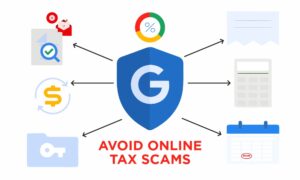
Google’s official guidance, published on March 19, 2026, shows that tax scams often use urgency, fake refund messages, and lookalike websites to trick people into clicking fast. The firm’s advice focuses on simple checks that help users slow down, verify what they see, and rely on built-in protections before sharing any personal or financial details. Here are the ways on how to avoid online tax scams-
1. Screen Those “too good to be true” Calls on Pixel
As per Google, scam calls often start with pressure, urgency, or promises that sound unusually helpful. Pixel phones can help filter spam calls with Call Screen, while Scam Detection uses on-device AI to warn users when a live conversation appears to be a scam. The point is to stop a suspicious call before it creates panic or confusion.
2. Fact Check Fraud in Seconds
Tax scams also arrive as texts or messages that look official. Google recommends checking suspicious messages with Circle to Search or Lens, which lets people inspect a message quickly and get guidance on whether it may be fraudulent. This is useful when a scam is hiding inside a normal-looking chat or social media post.
3. Spot a Fake Website Before It Gets You
Google’s Safe Browsing tool checks websites in real time against known threats. If a tax site is fake or dangerous, users can get warned before entering passwords or other sensitive information. This step matters because scam sites often copy the look of real tax services.
4. Look Out for Gmail Alerts, and Enroll in Passkeys
Google says Gmail displays warning banners when a message looks suspicious, such as a fake tax notice or a risky sender. It also recommends Security Checkup, Passkeys, 2-Step Verification, and Google Password Manager to strengthen account protection beyond email warnings alone.
5. Know Who is Behind the Ads You See
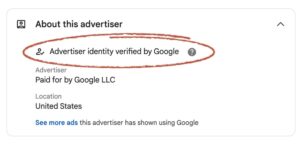
Scammers can also use ads to appear trustworthy. Google’s ads transparency tools help users verify an advertiser’s name, location, and verification status, so they can check who is actually behind a tax-related ad before clicking.
Stay Protected from Tax Scams!
The primary step to staying secure and strengthening our defenses in the tech-first era is appropriate awareness. As scammers advance with their strategies, it is high time for taxpayers to elevate their awareness and identify scam attempts. Follow Google’s strategies on how to avoid online tax scams and reduce stress in the tax season.
SecureITWorld is a leading resource for emerging threats in the technological era. Read our informative blogs and stay prepared to overcome prevalent threats!
FAQs:
Q1. How to identify a fake income tax notice?
Answer: Check Document Identification Number (DIN), use the E-Filing portal, authenticate features, including Quick Links, and check results to identify a fake income tax notice.
Q2. How to outsmart a scammer online?
Answer: Staying alert, not responding to suspicious approaches, and reporting at the earliest can help you outsmart a scammer online.
Q3. How to verify if a tax refund email is legitimate?
Answer: Do not click on attacked links. Additionally, log in to the official websites for tax and check your status.
Also Read:
How to Combat Online Scams and Stay Secure in the Digital Age?
What Is a Financial Scam? Types, Tactics, and Why They Happen