
WhatsApp introduces ‘Strict Account Settings’ in its 2026 Update, enabling advanced protection for users from highly sophisticated cyberattacks like spyware. This lockdown-style feature can be highly beneficial for public figures and journalists while safeguarding themselves from next-gen attacks.
While the entire rollout can take another week, users anticipate experiencing more protected conversations and usage on WhatsApp.
Notably, WhatsApp has been a common platform for cybercriminals to target users. Account hijacking, data scraping, and spyware have been common threats to WhatsApp. While executing these cyber-attacks, attackers often target public figures and journalists to steal data for malicious purposes.
To address such risks and make the platform experience safer, WhatsApp has introduced Strict Account Settings. Let us understand what this feature includes, how it works, and how to enable it for advanced security.
Understanding WhatsApp’s Strict Account Settings
WhatsApp’s new Strict Account Settings is a lockdown-style feature that adds solid security layers while using WhatsApp. Users can now lock their accounts with a few clicks to safeguard their personal chats. This feature can automatically block attachments, media, and other files from unknown senders.
Additionally, Strict Account Settings can silence calls from unknown numbers and restrict specific settings that may also impact the way the app operates. WhatsApp introduced the feature to allow users to keep their personal conversations private on the platform. It has been launched to address sophisticated and rare cyber-attacks that often create challenges for public figures.
Strict Account Settings is a step toward WhatsApp’s initiative to continuously strengthen its security framework and offer extreme protection.
What does WhatsApp’s Strict Account Settings include?
WhatsApp’s Strict Account Settings feature is set to offer extreme security from rare and sophisticated cyber-attacks. Here are the key changes after users enable this feature-
Media Blocking:
Once turned on, the feature of Strict Account Settings can automatically block media, attachments, and other files from unknown sources. It helps keep suspicious and malicious files away from your conversations, the application, and the device.
Calls Silencing:
The feature of Strict Account Settings silences calls from unknown and unsaved numbers. It helps reduce spam calls on WhatsApp and prevents spammers from initiating voice calls on the platform.
Restricted Link Previews:
The feature turns off previews for links from unknown sources. It stops redirection to malicious and unsafe websites.
Secured Group Invitations:
WhatsApp’s new security feature also makes group invitations and additions more secure. Unknown numbers cannot add users to random groups with suspicious content.
How to Use the New WhatsApp Feature?
Enabling the Strict Account Settings feature on WhatsApp follows a few simple steps.
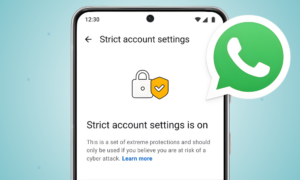
- Open WhatsApp
- Go to Settings
- Open Privacy
- Go to Advanced
- Enable Strict Account Settings
Open WhatsApp- Settings > Privacy > Advanced
Who is This Feature Meant For?
The Strict Account Settings feature is rolling out for all WhatsApp users. However, it is introduced considering the need for robust security of public figures like journalists on the platform. Attackers often target such personalities on the platform to secretly access their personal chats and steal data through malicious links.
The feature will not only block unwanted and unsafe approaches but also allow users to use WhatsApp in a safer way, maintaining privacy. The lockdown-style approach can change the way WhatsApp usually operates, but it can make conversations encrypted and protected from threats.
Concluding Remarks!
WhatsApp is the most popular messaging platform worldwide, with over three billion users. People across 180 nations use it regularly for personal and professional usage, sharing confidential and private information. Privacy becomes a primary factor while managing conversations of such a vast user base.
WhatsApp Strict Account Settings is an advanced step to protect users from scams and threats on the messaging platform. So, enable it today and make your WhatsApp conversations safer.
Our expert-led blogs offer a holistic picture of emerging innovations, tech trends, and cybersecurity practices. Read the blogs and stay informed in the changing threat ecosystem.
FAQs:
Q1. Can WhatsApp get restricted?
Answer: Yes, your WhatsApp account can get restricted if you violate the platform’s Business Policies and Terms of Service. This can lead to temporary or permanent account bans.
Q2. How to solve a restricted WhatsApp account?
Answer: To solve a restricted WhatsApp account, users can request a review on the application or by visiting the WhatsApp Help Center. It can take 24-72 hours to resolve the issue of a restricted account.
Q3. Can I recover my WhatsApp account?
Answer: Yes, you can recover your WhatsApp account by reinstalling the application and verifying your phone number.
You May Like to Read:
How Can Social Media Users Manage Their Privacy Settings Effectively?