OpenAI has introduced a virtual way to shop: a new "Try on" button for clothes and accessories in ChatGPT. This gives online shoppers a visual way to see how clothing and accessories look before buying, and to save favorites for later. The Try on button appears on product listings for clothing and accessories. The feature was mentioned in the company's release note on October 1, 2026, allowing users to see how products could look on them using ChatGPT images.
How to Virtually Try on Clothing and Accessories?
When a clothing or accessory product appears in ChatGPT’s shopping results, users can try an item using the steps below.
- Select the "Try on" button on a clothing or accessories product listing.
- Take or upload a selfie
- ChatGPT generates your try-on image, which you can view.
Another interesting feature is that you can upload a photo of clothing or accessories in a conversation and ask ChatGPT to show how the item will look on you. This expands ChatGPT's role from recommending products to helping shoppers visualize products and make potential purchases.
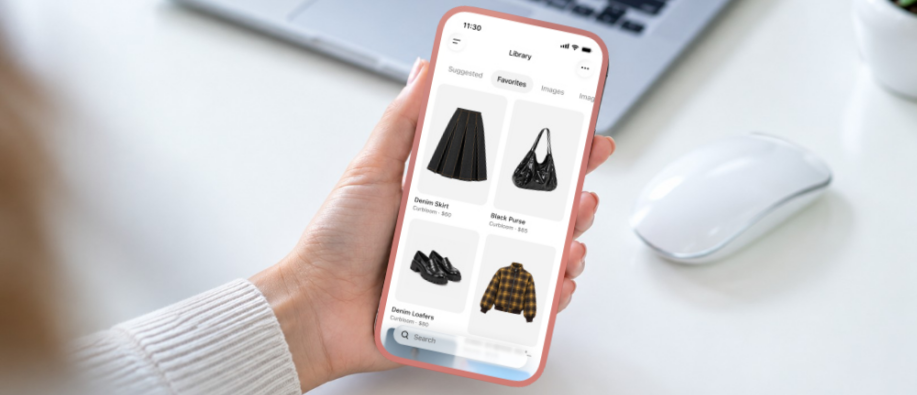
Users can also save any product to Favorites or create a folder to organize finds within their ChatGPT Library. This gives shoppers an easy way to return to products they previously saved in a folder and compare options later.
However, OpenAI has stated that virtual try-on images show only visualizations and do not guarantee fitness or size. Shoppers are advised to check the merchant’s measurements, product details, and return policies before purchasing.
Save and Manage Reference Photos
A key feature is that users can save reference photos for future try-ons. This lets users use them directly without uploading them again. They can even change or remove photos in Settings.
The following are the steps to manage reference photos:
- Open Settings > Personalization > Reference Photos.
- Select the photo you want to manage,
- Select Change photo to replace it or select the delete icon to remove it.
Availability
The Try on button is available in ChatGPT on mobile and web versions.
The Bigger Picture
While Google has offered similar virtual try-on capabilities, OpenAI is bringing the experience directly into ChatGPT’s conversational shopping workflow. This clearly suggests OpenAI's broader push towards AI-powered shopping, wherein users can try everything virtually and improve their shopping experience.
Want to stay updated with the daily tech news? Make sure to visit our website.
Also Read:
OpenAI’s Lockdown Mode: How Does it Prevent Prompt Injection Attacks