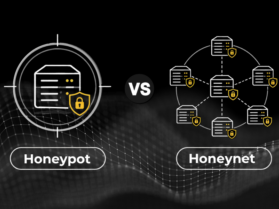

Most articles explaining honeypot vs honeynet start with the same answer: one is a single system, and the other is a network of systems. That is technically correct, but it misses the more useful question:
What can you actually learn from each one during an attack?
A honeypot can help security teams see who is targeting a particular system and what they are trying to do. A honeynet can show what happens after an attacker gets in, including whether they move between systems or look for other resources. So, the real difference is not simply how many systems are involved, but how deeply you need to understand the attack.
What Is a Honeypot?
Imagine a server in a company that nobody is supposed to use. It has an SSH service, looks like it belongs to the network, and may even contain files that make it look interesting to an attacker. If someone discovers it and starts trying different passwords, the security team can monitor exactly what they do.
This is the basic idea behind a honeypot in the honeypot vs honeynet discussion.
A honeypot is a system, service, or resource set up to attract unauthorized activity and record what happens. It can imitate a database, application, file server, SSH service, or another target an attacker might investigate.
Its value lies in the information it produces. The security team can see which credentials were tested, what commands were attempted, and which tools the attacker brought into the system.
This makes the honeypot concept useful when the investigation starts with one question: Who is trying to access the system, and what are they trying to do?
What Is a Honeynet?
Imagine an attacker has already gained access to one system and is now looking for a way further into the network. They find another server, reuse collected credentials, and scan other systems.
This is where a honeynet becomes useful. Instead of giving an attacker one system to interact with, a honeynet connects several systems on the same network. These could include servers, applications, workstations, and other internal services.
The attacker can interact with these systems much like they would in a real network. That gives the security team a much better view of how the attack develops. They can see which systems they investigate, whether they reuse existing credentials, and what they try to access next.
A single honeypot can show you what an attacker does on one target. A honeynet, by contrast, lets you see what happens across several connected systems. This makes it particularly useful for attacker behavior analysis when evaluating honeypot vs honeynet deployment.
Honeypot vs Honeynet: Which One Fits Your Security Needs
| Factor | Honeypot | Honeynet |
| Environment | One system or service | Multiple connected systems and services |
| Attack stage | Useful from scanning through initial access | More useful for studying activity after an attacker gains access |
| What can you observe | Login attempts, exploits, commands, malware, and activity on the target | Credential reuse, system discovery, privilege escalation, and attempts to access other systems |
| Operational effort | Easier to deploy and monitor | Requires more planning, monitoring, and maintenance |
| Containment | Must be isolated from production systems | Requires strong isolation because multiple systems are connected |
| Data to analyze | Usually more focused and manageable | More detailed and spread across multiple systems |
| Interaction options | Can be low-interaction or high-interaction | Can include different types of honeypots |
| Best suited for | Focused monitoring and investigation of one target | Studying attacker activity across a simulated network |
| Example | A fake SSH server that records login attempts | A simulated network with a web server, workstation, and database |
Low-Interaction vs High-Interaction Honeypot
Beyond the honeypot vs honeynet distinction, another difference is worth noting. One important factor to remember is that not all honeypots behave the same way. Some imitate only a few services, while others give attackers a complete environment to interact with. That difference can have a bigger impact on what your security team learns from the activity.
A low-interaction honeypot copies limited services such as an open port or login service. It doesn't provide attackers with a complete operating system; it helps with intrusion detection, including scans, brute-force attempts, and automated attacks. But the major shift is that it provides less information about what happens after access.
A high-interaction honeypot gives an attacker a more complete environment, such as a real operating system, applications, and files. This can expose attacker commands, tools, and privilege escalation. However, it requires stronger isolation and monitoring because the attacker has more freedom to interact with the system.
The choice comes down to how much interaction you need to observe and how much risk your team can safely handle.
Which One Should You Deploy First: Honeynet or Honeypot?
Before choosing between a honeypot and a honeynet, look at what your security team can manage. A honeynet can generate more activity across several systems, which means more data to monitor and investigate.
If your team is still building its monitoring and response process, a single honeypot can be a useful starting point.
Once the team can continuously collect, review, and act on the data, expanding the setup becomes easier. In the honeypot vs honeynet decision, the question is not only what you want to observe, but whether you have the people and processes to make use of what you collect.
Conclusion
Honeypot vs honeynet information is only useful when the collected data leads to something your security team can act on. An unusual login attempt can point to a weak credential, and the same activity across several systems can expose gaps in network controls.
That makes the value of these setups go beyond catching attackers. The activity they capture can help teams identify weaknesses and improve their defense before they become real incidents.
Ultimately, the goal isn't just to collect the most data. It is to collect the right data and turn it into better security decisions.
For more security related updates and information please visit our official website now!
FAQs
Q1. Can honeypots be detected by attackers?
Answer: Yes. Attackers can detect a honeypot by identifying abnormal configurations, limited functionality, or suspicious network activity. More realistic honeypots are designed to reduce these indicators, but no honeypot can be considered completely undetectable.
Q2. What is the difference between a honeyfile and a honeypot?
Answer: A honeypot is a decoy system or service set up to attract and track unauthorized activity.
A honeyfile is a decoy file that looks important and helps detect unauthorized access or theft.
Also Read: