
AI assistants in the workplace are common today. We rely on these assistants to get the work done. Right from drafting emails to creating sales collaterals, PPTs, and more, you share the prompt and get the desired result. This is all about the simple request and respond model. But how about a tool that acts on your behalf in the background constantly?
That’s amazing! Here comes the newly introduced always-on agent, Microsoft Scout, that works autonomously on behalf of users, making its entry into a new category of agents called Autopilots. Keep reading the blog to understand everything about Microsoft Scout, including its key capabilities, features, limitations, and more. So, let’s get started!
A Look into Autopilots
Autopilots are always-on agents that work on your behalf. They stay active in the background, understand how work is done across your apps and systems. Then, accordingly, these autopilots take action and complete the work. You don’t need to share the prompt every time. When your attention is not there, it will carry out its work according to the rules or policies your organization sets.
Brief About Microsoft Scout
Scout is the first Autopilot agent in Microsoft 365 that can perform tasks independently. Introduced on June 2, 2026, Microsoft Scout is among the top updates focused on autonomous agents. It is a personal, always-on agent integrated across Microsoft 365 apps, keeping it grounded in your workflow.
Scout operates across desktops, cloud, and web. Alongside, it connects with Teams, OneDrive, Outlook, and SharePoint, plus data that keeps your work going, including calendar, chats, emails, and contacts. Scout is built on OpenClaw, a popular open-source AI agent framework.
It truly reflects the company’s commitment to building together to meet enterprise needs. Omar Shahine, Corporate Vice President of Microsoft Scout stated in the blog post, “Microsoft Scout is built with enterprise-grade security and controls so it can be trusted in your organization from day one.”
How Does it Work?
Here are the simple steps describing how Microsoft Scout works:
- Describe your task: In the first step, users need to share their task or objective in the chat interface.
- Select Tools: It gathers information from Microsoft 365 apps such as
Outlook, Teams, OneDrive, SharePoint, and Office documents, and shows progress in real-time.
- Approve the Action: Before execution, users must approve actions such as sending emails or writing files.
- Results: Users then get the desired results in the conversation and can save files to their workspace.
Some Key Capabilities of Microsoft Scout
The following are some of the noteworthy aspects of Microsoft Scout that every user should know:
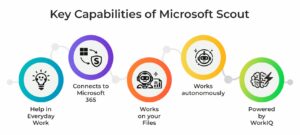
- Help in Everyday Work: Scout can schedule and coordinate meetings across time zones, flag important meetings, and more
- Connects to Microsoft 365: Manage your Teams messages, OneDrive, Outlook, and calendar.
- Works on your Files: Can create, edit, or search documents in your workspace. Works well with Excel, Word, and PowerPoint.
- Works autonomously: Checks for upcoming deliverables and then blocks time on your calendar or the triggers you define.
- Powered by WorkIQ: Uses Microsoft WorkIQ technology, the intelligence layer that understands your work patterns, context, analyzes routine tasks, and more.
What are the Prerequisites to Get Started with Microsoft Scout?
To get started with Microsoft Scout, you need to meet the following requirements:
- Windows 11 or macOS 12
- Access to a Microsoft 365 license
- Local admin access to install apps on your machine
- IT admins also need to complete Microsoft Scout access setup before signing in.
Benefits of Microsoft Scout for Organizations
Increased Productivity
Employees can spend less time on administration and more time on important tasks.
Improved Collaboration
Coordinating teams is made easier with Scout's integration across teams, Outlook, and Microsoft 365 apps.
Reduced Operational Costs
By reducing repetitive manual work, automation helps save time and increase operational efficiency.
The Role of OpenClaw
OpenClaw plays a crucial role in Scout's independent functioning. The framework provides a roadmap for AI agents to think, plan, and act in virtual environments.
Key features Scout unleashes from OpenClaw:
- Scalable automation capabilities
- Enhanced interoperability
- Improvements in AI agent technology
The framework also aligns with Microsoft's broader strategy of building intelligent AI agents to run enterprise workflows.
Limitations to Know!
- Complex Tasks: Multi-step tasks with dependencies cannot always be completed as expected.
- Needs Clear Prompts: If your instructions are not clear, Microsoft Scout may misunderstand them and take action that does not meet your intent.
- Three-Tier Permission: Shell commands have three permission levels. Dangerous commands get blocked or need approval.
- Does Not Operate Outside Directory: Microsoft Scout can only operate within your workspace directory. Files outside your directory cannot be accessed unless you grant permission.
Wrapping it Up!
Workspace AI is transforming at a rapid pace, and Microsoft Scout stands as a major innovation in this space. Built on OpenClaw and integrated with Microsoft 365 apps, it’s an ideal way for workflow automation, increasing productivity, and eliminating the time required to perform tasks on your own. These autopilot agents carry everything on their own and unlock high levels of efficiency across the enterprise.
Stay updated with the latest blog posts published on our website here!
Recommended For You:
How AI Agents for Detection Optimization Strengthen Security?
AI Agents in Cybersecurity: What’s Working Today and What’s Not?