

With AI transforming every facet of our lives, how can we skip software security? The capabilities AI possesses are limitless. The good news is that large language models are now making big leaps even in the cybersecurity space by discovering vulnerabilities and fixing them at an unprecedented speed.
Google is now shifting to use AI to improve vulnerability discovery, triage, and patching in its Chrome browser. This is a great move by the tech giant to make the web a safer place for everyone by unlocking AI's potential. This blog takes you through a complete overview of how Chrome is using AI to fix vulnerabilities and build a safer web. Let’s get started.
The Life of a Security Bug
Some software bugs have security consequences. While functional bugs can cause glitches, security vulnerabilities can be exploited to steal private data or gain unauthorized control of a device. Once a security bug enters the codebase, the lifecycle is seen as follows:
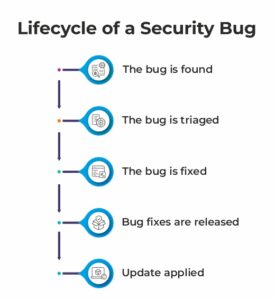
- The bug is found: AI-powered systems scan Chrome’s codebase for potential vulnerabilities.
- The bug is triaged: AI determines whether reports are duplicates, legitimate, and severe.
- The bug is fixed: AI agents generate potential fixes and support tests.
- Bug fixes are released: Security fixes are moved through Chrome’s release process.
- Update applied: Once updates are applied, Chrome is restarted.
Chrome’s security strategy primarily focuses on improving the overall process using AI.
Found ->Triage->Fixed->Fixes Released ->Apply Updates
How Chrome is Using AI for Vulnerability Discovery?
Since 2023, Chrome’s security team has been using LLMs. In 2024, it developed a vulnerability detection tool called Naptime. Then, in 2025, Chrome collaborated with DeepMind and Project Zero on Big Sleep, an AI vulnerability-discovery agent that found bugs in the V8 JavaScript engine and the graphics stack.
Now, in 2026, Google built an agent harness using Gemini to discover vulnerabilities in the Chrome codebase with higher efficiency and lower false positives. One of the noteworthy parts is that AI found a sandbox escape, a vulnerability that had been hiding in the codebase for 13 years. Further improvements were made:
- Add support for model interoperability to utilize the unique strengths of both open-weight and proprietary models.
- Build a Chrome knowledge base that includes all previously identified CVEs and Chrome's entire Git history to extend the LLM's reasoning beyond its training data.
- Add a critic agent with a separate context to SECURITY.md files.
How is AI Helping Fix Vulnerabilities?
Finding a bug is only half of the job done. The real challenge comes in fixing the bug. Chrome is relying on a multi-agent workflow to complete it. A fixing agent can return multiple candidate fixes, whereas a critic agent then evaluates which would be ideal, producing other artifacts for developers to evaluate the fix.
Both of these agents work in a loop that mimics a code review process to ensure that code is functional and compliant with Chromium and Google Style guidelines, as well as other local code conventions. Chrome 149 and Chrome 150 fixed a total of 1,072 vulnerabilities.
The test-writing agents help write tests for fixes. This provides clear evidence that LLMs are outperforming in generating fixes for most vulnerabilities in recent Chrome releases.
Triaging Vulnerabilities
Triaging a single security report would take around 5 to 30 minutes or more and mainly rely on human expertise. Google is moving its triage process towards an automated approach with AI to increase throughput and accuracy. The automated triage process comes in four stages:
- Noise reduction: The filter checks if the AI-generated bug meets intake criteria and verifies that it describes a Chrome security vulnerability.
- Reproducing bugs: The system checks for proof of concept. Reproducible bugs are tested on specific operating systems and the browser version they affect.
- Add metadata to reports to include when the bug was first introduced and its severity rating.
- Automatic assignment: Assigns the right person to handle the task.
Prevention is Better than Patching
Google is going beyond just fixing vulnerabilities. The company is also investing in the mitigation and elimination of security bugs, as well as in preventing them.
- Memory Safety is the Key Focus: Chrome is implementing a two-layered memory-safety strategy, hardening the runtime environment to neutralize legacy C++ vulnerabilities while moving to memory-safe languages for long-term resilience.
- MiraclePtr & Miracle Object Expansion: Google is expanding its memory safety efforts beyond MiraclePtr to libraries such as Skia, ANGLE, C++ iterators, and standard containers to further reduce use-after-free (UAF) bugs.
- Spanification: To eliminate out-of-bounds (OOB) spatial safety errors, Chrome has undertaken a spanification effort, shifting from legacy pointer-and-size constructs to compiler-enforced span types.
Chrome reports that 97% of first-party Chrome code complies cleanly with strict, unsafe-98 warnings. Alongside this, the long-term solution is shifting Chrome's codebase towards memory-safe languages like Rust.
Why Does This Happen When Users Don't Restart?
Chrome applies updates when it restarts; however, some users leave the browser open for longer periods. Google is working on a mechanism to apply updates without restarting Chrome. They are trying to increase the amount of data stored locally so that sessions can resume where they are left off after a restart.
Another point is the unique application state on macOS where applications continue running in the background even after all windows are closed. In case Chrome detects a pending update while in this windowless state, it restarts automatically. In the macOS version of Chrome 150, it has been changed to automatically restart and apply the update when the window is closed.
Chrome is Using AI to Secure the Broader Web
Keeping the web safer involves more than simply securing Chrome. The search has more than 2,300 third-party dependencies across Chromium and satellite projects, including the V8 JavaScript engine, the BoringSSL cryptography library, and components such as ANGLE, Skia, and Dawn. Around 1,700 of those are shipped to users in some capacity. Keeping these systems requires constant monitoring and automated vulnerability scanning.
Chrome is constantly working to keep these dependencies patched by relying on automated vulnerability-scanning pipelines. As stated by the company, “We are starting to move all Chrome third-party dependencies onto automated pipelines that proactively roll them to their latest upstream versions."
Wrapping It Up!
The emergence of LLMs is changing software security, but it is giving defenders new ways to stay ahead. By combining rapid deployment mechanisms with deep structural defenses, Google said the company is ensuring the advantage remains firmly with defenders. As Google continues to dominate 90% of the search market, making it the first gateway to the web, it's giving rise to exploits in the age of AI.
The goal is more than just fixing bugs; it's about building a browser that can identify weaknesses, prevent vulnerabilities, and do so with minimal disruption to users. Chrome is using AI to move towards a safer web!
Continue reading more informative blog topics on our website. We aim to empower readers with diverse tech topics.
Recommended For You:
Google Chrome Zero Day Vulnerability: All You Need to Know About