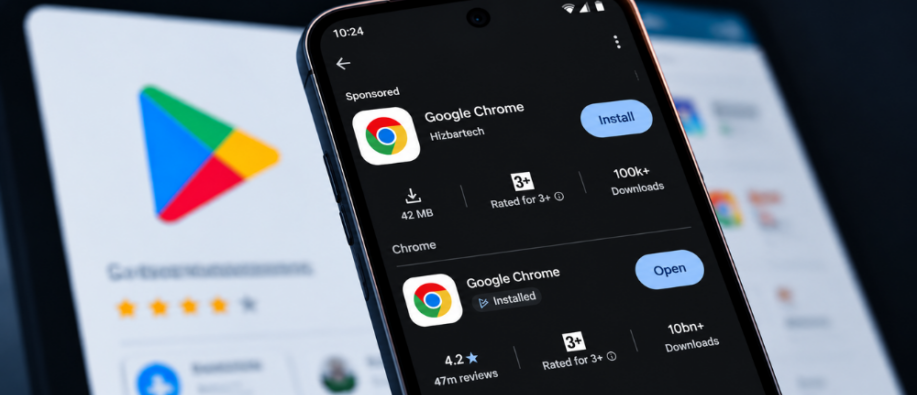
A fake Google Chrome app reportedly received more than 100,000 downloads on the Google Play Store and appeared at the top of search results for "Chrome." On October 14th, a Reddit user shared a post with a screenshot showing the actual Play Store listing for the fake app. The developer was listed as "Hizbartech."
How Did the App Appeared at the Top of Play Store Search?
The counterfeit application copied the official Chrome icon, name, and description and reportedly appeared above the Chrome browser in search results after being promoted through paid ads. The real browser, published by Google LLC, appeared below the sponsored result.
The Fake Chrome Browser was Originally a Game
According to Android Authority and PiunikaWeb, the app was first published as a game called "Ball Bounce" in August 2026 under the developer named Hizbartech. The reported 100,000 downloads may also include installations from when the app was listed as Ball Bounce, not just as fake Chrome.
Users who installed the app reported that it didn't function as a browser. Rather, it opened a chat-style interface featuring AI avatars, automated responses, and ads. Google removed the fake Chrome app from the Play Store after online concerns were raised. However, this incident raises security questions about Google Play’s app review process and impersonation of popular brands on the Play Store.
Even though the Play Store is Google’s official marketplace for Android applications, users should not rely on download counts and familiar branding. Paid ads don't guarantee an app is real, and a high download count doesn't reflect an app’s identity.
How to Avoid Downloading a Fake Google Chrome App?
Before installing the app, keep an eye on a few details to reduce the risk of downloading a fake app.
- Verify the developer's name: The official Chrome browser is published by Google LLC. Make sure the publisher is Google LLC, not Hizbartech.
- Check permissions: A browser needs a few permissions to operate, but requests unrelated to its purpose should raise caution.
- Pay attention to sudden application changes: An application that changes its name or purpose requires closer attention.
- Google Play Protect Enabled: The built-in Android security feature scans applications for harmful behavior. It offers an additional layer of protection.
This update clearly signals that you shouldn't trust apps unquestioningly, and that security is a priority.
For the latest tech news, visit our website now.
Also Read:
Google Chrome Zero Day Vulnerability: All You Need to Know About
How Chrome is Using AI to Close the Vulnerability Gap and Build a Safer Web?